Your Name in Landsat – Create a Satellite Image Name from Earth
Type your name and turn it into a beautiful satellite-style image made from Earth-inspired letter shapes. Create, download, and share your Landsat name art online.
What Is Your Name in Landsat?
Your Name in Landsat is a creative online name generator that turns ordinary text into a visual artwork inspired by real satellite imagery of Earth. Instead of using a normal font, every letter in your name is represented by a landscape, river, coastline, mountain range, lake, desert pattern, ice formation, road network, or other Earth feature that naturally resembles a letter of the alphabet.
The idea became popular because it makes satellite imagery feel personal. Most people think of Earth observation data as something used by scientists, governments, climate researchers, or mapping platforms. Your Name in Landsat changes that feeling immediately. You type a name, a word, a short message, or a nickname, and the tool transforms it into a row of beautiful Earth images that look like letters from space.
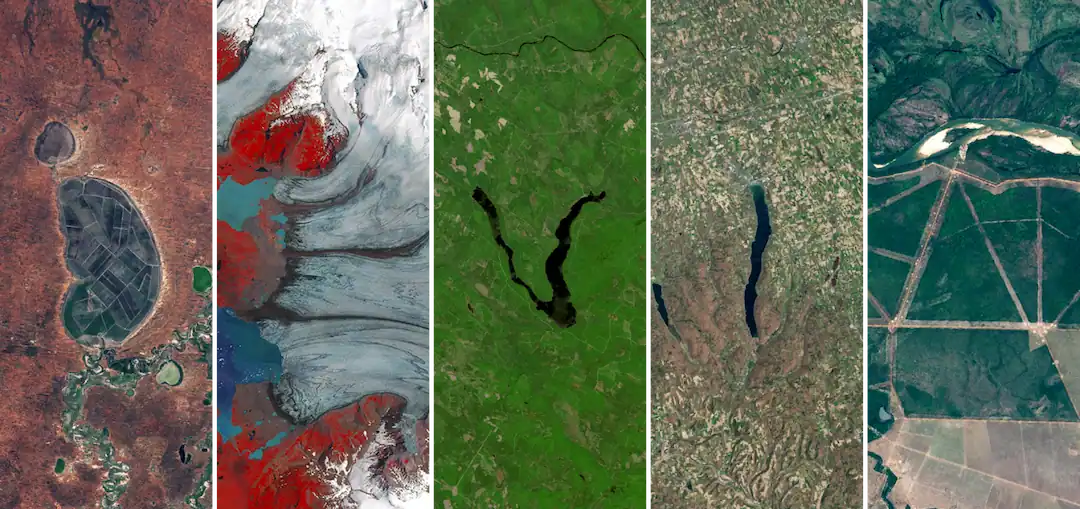
This version is designed as an easy-to-use, browser-based satellite name generator. It is inspired by the Landsat letter concept and focuses on a fast, shareable experience: enter your text, preview the result, customize it where possible, download the image, and share it with friends, classmates, family, or followers.
The magic comes from the contrast between something deeply personal — your name — and something planetary — Earth viewed from above. A simple word becomes a miniature gallery of landscapes. A letter might look like a winding river. Another might come from a volcanic crater, a snowy valley, a desert channel, a coastline, or a human-made pattern visible from orbit. The result feels like a name written by Earth itself.
How to Use the Your Name in Landsat Generator
Using the Your Name in Landsat tool is simple. You do not need to install anything, create an account, or understand satellite data.
1. Enter your name or word
Type your name, nickname, brand name, classroom group, short phrase, or any word you want to visualize. For the best result, use letters from A to Z. Shorter names are usually easier to read, while longer words create a wider image that looks more like a satellite alphabet banner.
Examples you can try:
- Emma
- Earth
- Explorer
- Love
- Science
- Your brand name
- A classroom team name
2. Generate your satellite name image
After entering your text, click the generate button. The tool will match each letter with a satellite-style image that resembles that character. Your word will appear as a sequence of Earth images arranged from left to right.
Each letter is not just a flat graphic. It is a real-world-inspired visual tile, so the final name image feels more organic than a normal text design. Some letters may look sharp and geometric, while others may feel soft, natural, watery, icy, rocky, or colorful.
3. Explore the letters
Depending on the available image set, each letter may represent a different type of Earth feature. You may see rivers, lakes, coastlines, mountains, craters, agricultural fields, islands, deltas, roads, snow, or desert formations. This is one of the best parts of the experience: the name is not only decorative, but also a small discovery journey.
If the tool includes location details, you can check where each letter-like image comes from. This makes the generator more educational and more interesting for students, teachers, map lovers, space fans, and anyone curious about how Earth looks from above.
4. Download your image
Once your name looks good, use the download option to save it as an image. You can use it as a profile banner, classroom activity result, digital postcard, social media post, presentation decoration, wallpaper, or a fun personalized gift.
For the cleanest result, keep your word short and avoid too many repeated letters unless the generator supports multiple variations for the same letter.
5. Share it online
Your generated Landsat-style name image is made for sharing. You can send it to friends, post it on social media, use it in a science project, or include it in an Earth Day activity. Because the image is visual, personal, and easy to understand, it works well on platforms where people scroll quickly.
Main Features
Satellite-style alphabet
The core feature is the satellite alphabet. Each letter is represented by an Earth-inspired image that resembles a character. This creates a natural “space font” effect that looks very different from ordinary typography.
Instant name preview
You can type a name and quickly see how it looks. This makes the tool easy to play with. Try your first name, last name, username, pet name, project name, or a short message.
Downloadable image
The generated result can be saved as an image, making it easy to reuse outside the website. You can keep it as a personal design, send it to someone, or use it in a school or science-themed project.
Share-friendly layout
The final image is arranged in a clear horizontal layout, making it suitable for social posts, link previews, cards, and digital messages.
Educational value
Your Name in Landsat is not only a fun image generator. It is also a simple way to introduce people to satellite imagery, Earth observation, geography, landforms, remote sensing, and the visual beauty of our planet.
No design skills needed
You do not need Photoshop, Illustrator, mapping software, or any technical knowledge. The tool handles the visual composition automatically.
Why Use Your Name in Landsat?
There are many name generators online, but most of them simply apply a font, color, or effect. Your Name in Landsat feels different because it connects your name with the real visual patterns of Earth.
First, it is personal. People naturally enjoy seeing their own name transformed into something unusual. A name written in satellite imagery feels more memorable than a normal text logo or decorative font.
Second, it is educational. The tool makes satellite imagery approachable. Instead of starting with technical words like multispectral data, remote sensing, or land cover classification, it starts with a simple question: what would your name look like from space? That question is easy to understand, even for children.
Third, it is highly shareable. The result is visual, surprising, and easy to explain in one sentence. That makes it ideal for social media, Earth Day campaigns, classroom activities, science blogs, newsletters, and interactive learning pages.
Fourth, it encourages curiosity. After generating a name, many users naturally want to know where the images came from, what kind of landscape formed each shape, and how satellites capture Earth from above. A playful tool can become the first step toward learning about geography, climate, land use, glaciers, rivers, forests, coastlines, and human impact on the planet.
Finally, it is simply beautiful. Earth is full of unexpected patterns. From orbit, rivers can look like letters, lakes can look like symbols, and mountain shadows can form shapes that are hard to notice from the ground. Your Name in Landsat turns those accidental patterns into a personalized artwork.
Best Ideas for Using Your Landsat Name Image
You can use your generated image in many ways:
- Create a unique profile banner
- Make a personalized Earth Day card
- Design a classroom science activity
- Add it to a geography or space presentation
- Send a custom image to a friend
- Make a nameplate for a student project
- Create a fun visual for a blog post
- Use it as a creative intro to satellite imagery
- Make a digital postcard
- Generate a brand-style wordmark for a science or nature project
For teachers, this tool can be used as a quick classroom opener. Ask students to generate their names, then discuss what types of landforms they see. For families, it can be a fun weekend activity. For creators, it can become a visually interesting social post. For science communicators, it is a simple way to make Earth observation feel less abstract.
Tips for Better Results
Use short words when possible. A name with 4 to 8 letters usually looks cleaner than a very long phrase.
Use uppercase-style words if the generator supports them visually. Satellite letter images often work best when each tile has a strong, readable shape.
Try multiple versions of the same name. For example, use your first name, initials, nickname, or username.
Avoid special characters unless the tool supports them. Letters A-Z usually produce the most reliable result.
Use the download option after you find a version you like, especially if the tool offers different letter variations.
FAQ
Is Your Name in Landsat free to use?
Yes, this tool is designed to be free and easy to access in your browser. You can type a name, generate a satellite-style result, and download or share the image without needing design software.
What kind of text can I enter?
For the best result, enter letters from A to Z. Names, short words, nicknames, classroom names, and simple messages usually work best. Very long text may create a wide image that is harder to read on small screens.
Can I download my Landsat name image?
Yes. After generating your name, use the download button to save the image. You can then share it online, use it in a presentation, send it to friends, or keep it as a personal design.
Why does my name look different from a normal font?
Your Name in Landsat does not use ordinary typography. Each letter is represented by an Earth-inspired image tile that resembles a letter shape. That is why the result looks more natural, varied, and artistic than a standard text generator.