Your Name in Landsat Generator: create a satellite name image
Turn any name, word, or short phrase into a satellite-style image made from Earth-shaped letters. The Your Name in Landsat generator lets you type your text, preview the result, adjust spacing and rounded corners, then download, share, or embed your Landsat name art.
No design software is needed. If you can type a name, you can make a custom satellite alphabet image in a few seconds.
Here is what you can do:
- Generate a Landsat-style name from A-Z letters
- Download the result as a PNG image
- Change the spacing between letters
- Round the outer corners for a softer badge look
- Keep or remove spaces in multi-word phrases
- Share the exact result with a link or QR code
- Embed the finished artwork on a website with an iframe
What is Your Name in Landsat?
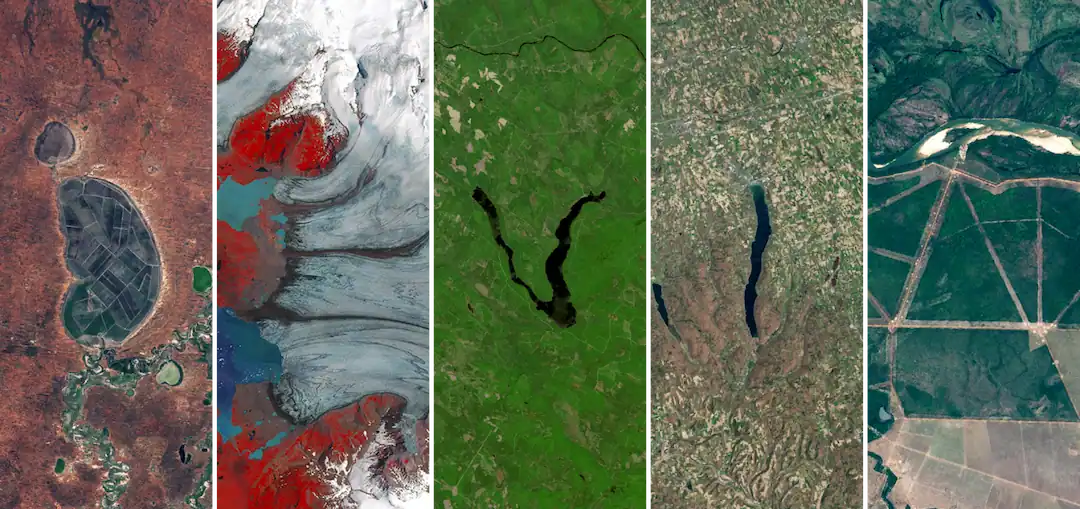
Your Name in Landsat is a free online satellite name generator. Instead of drawing letters with a normal font, it builds each letter from Earth-inspired imagery: rivers, lakes, coastlines, mountain ranges, deserts, ice, roads, fields, islands, and other landscape patterns that look like alphabet shapes from above.
That is the hook:
Your name becomes a small gallery of Earth images.
The idea works because it combines something personal with something huge. A first name, classroom team name, brand word, or short message suddenly looks like it was written by the planet itself. One letter might look like a river bend. Another might look like a coastline, a crater, or a snowy valley.
The tool is designed for quick use in a browser. Enter text, generate the preview, fine-tune the layout, and save or share the result.
One note before you use it: this is a Landsat-style creative tool. The artwork is inspired by satellite views of Earth and the Landsat alphabet idea, but it is not an official NASA or USGS Landsat product.
How to use the Your Name in Landsat generator
You do not need an account, a mapping tool, or any knowledge of satellite data. Follow these steps.
1. Enter a name, word, or short phrase
Start with the text you want to turn into Landsat-style art. For the clearest result, use letters from A to Z and keep the phrase short.
Good examples:
- Emma
- Earth
- Explorer
- Love
- Science
- Earth Day
- A classroom team name
- A short brand name
Short names are easier to read. Longer phrases can still look good, but they create a wider image that works better as a banner than as a small avatar.
2. Generate the satellite name image
Click the generate button. The tool matches each letter with a satellite-style tile that resembles that character, then arranges the tiles from left to right.
The result is more organic than a standard text effect. Some letters look sharp and geometric. Others feel watery, rocky, icy, sandy, or green. That variation is part of the charm.
3. Look closely at the letter tiles
Each letter can feel like a tiny geography lesson. You may notice rivers, lakes, deltas, islands, farm fields, roads, snow, deserts, or coastlines.
If a letter includes location details, check them. This turns the generator into a simple classroom or family activity: make a name, then ask what landforms appear in each letter.
4. Adjust spacing, corners, and spaces
Use the controls below the input to shape the final image.
- Spacing changes the gap between letters from tight to airy. Tight spacing feels like a wordmark; loose spacing makes each letter look like a separate satellite photo.
- Corners rounds the outer container from a sharp rectangle to a soft badge. The radius uses fixed pixel values, so short and long names keep a consistent style.
- Keep spaces controls multi-word phrases. Turn it on to show a half-letter-wide gap between words. Turn it off to compress the phrase into one continuous Landsat word.
Every change updates the preview immediately. The same settings are also saved in the download and share link.
5. Download the PNG
When the image looks right, download it as a high-resolution PNG. The file keeps your spacing, corner radius, and space-handling choices.
Use it for:
- A profile banner
- A classroom activity
- A science presentation
- A digital postcard
- An Earth Day graphic
- A personal wallpaper
- A science or nature project wordmark
Tip: for the cleanest download, use a name with 4 to 8 letters. If your phrase is longer, try reducing the spacing before saving.
6. Share the exact result
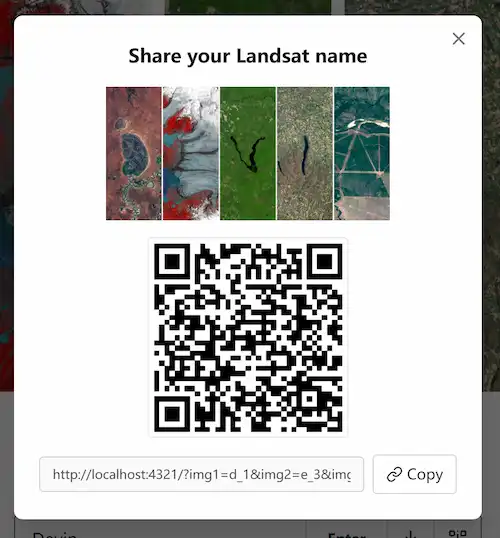
Use the QR-code button to create a shareable link and scannable code. The link stores your exact composition, including letter choices, spacing, rounded corners, and whether spaces are kept.
That means a friend, student, or reader will see the same Landsat name image you created, even on another device.
7. Embed it on a website
If you run a blog, portfolio, classroom site, or Earth-themed page, you can embed your Landsat name image directly into the page.
Click the embed button next to the QR-code button, then copy the iframe snippet. The embed view shows only the artwork, without the input box, sliders, header, or footer.
The iframe uses a transparent background, so it fits both light and dark layouts. You can adjust the width and height values in the snippet to fit a column, hero section, sidebar, or article body.
Main features
Satellite-style alphabet
Each letter is represented by an Earth-inspired image tile instead of a regular font. This gives the final result a natural space-letter look.
The style is meant to feel like satellite imagery. It should be understood as creative Landsat-inspired name art, not an official scientific data product.
Instant preview
Type a name and see the Landsat version right away. Try a first name, last name, username, pet name, project name, or short message.
PNG download
Save the generated image as a PNG and reuse it outside the website. The downloaded file matches the on-screen preview, including spacing and rounded corners.
Adjustable letter spacing
The spacing slider helps you balance readability and style. Use tighter spacing for long names and wider spacing for short names that need more presence.
Rounded container corners
The corner slider can turn a rectangular image into a softer badge. Small values feel clean and modern; larger values work well for stickers, cards, and square social graphics.
Smart space handling
Multi-word phrases can keep their spaces or collapse into one continuous word. This is useful for names like “Earth Day,” classroom groups, or first-and-last-name designs.
Share links and QR codes
Share the exact image with a link or QR code. This is useful for classrooms, posters, offline events, newsletters, and group activities.
Website embed
Create an iframe embed that displays only the final artwork. The embedded version reads the layout from URL parameters, so it matches the design you made on the homepage.
Why make a Landsat name image?
Most name generators add a font, color, or filter. A Landsat name image feels different because it connects the name to real-looking Earth patterns.
Here is why people use it:
- It feels personal. People like seeing their own name turned into something unexpected.
- It is easy to explain. “My name written in satellite images” makes sense in one sentence.
- It works for learning. Teachers can use it to introduce geography, landforms, Earth observation, and remote sensing.
- It is shareable. The image is visual enough for social posts, cards, classroom screens, and science blogs.
- It sparks curiosity. After making a name, many people start asking where the letter shapes come from and what kind of landscape they show.
For a simple tool, that is a nice payoff.
Best ways to use your Landsat name image
Use the generated image anywhere you want a personal Earth-themed visual:
- Profile banners and headers
- Earth Day cards
- Classroom science openers
- Geography and space presentations
- Student project nameplates
- Science blog visuals
- Digital postcards
- Nature-themed landing pages
- Portfolio “About me” sections
- School website headers
- Team names for classroom activities
For teachers, a good activity is simple: ask students to generate their names, then list the landforms they can identify in the letters. For creators, the image works as a quick visual hook for posts about Earth, maps, satellites, climate, or geography.
Tips for better results
Use a short word when possible. Names with 4 to 8 letters are usually easier to read.
Try variations of the same name. A first name, initials, nickname, username, or team name may produce a cleaner composition.
Avoid special characters unless the tool supports them. A-Z letters give the most reliable result.
Adjust spacing before downloading. Wider spacing gives short names more breathing room; tighter spacing keeps long phrases readable on small screens.
Use a small corner radius for a clean badge effect. Try 8-16 px first, then increase it if you want a softer sticker-style image.
For multi-word phrases like “Earth Day,” decide whether the space helps readability. Keeping the space makes each word clearer. Removing it creates a single compact wordmark.
Save the PNG after you find a version you like. Then copy the share link or QR code so you can return to the same layout later.
FAQ
Is Your Name in Landsat free?
Yes. The generator is designed to be free to use in your browser. You can create a satellite-style name image and download or share the result without design software.
What text works best?
Letters from A to Z work best. Names, nicknames, short words, classroom names, and simple phrases usually produce the clearest images. Very long text may become too wide for small screens.
Can I download my Landsat name image?
Yes. After generating and customizing your name, use the download button to save the image as a PNG. The file keeps your spacing and rounded-corner settings.
Can I share the same version I created?
Yes. The share link stores the letter selection, spacing, corner radius, and space setting. Anyone who opens the link or scans the QR code sees the same composition.
Can I embed the image on my website?
Yes. Click the embed button and copy the iframe snippet. The embed shows only the artwork and uses a transparent background, so it can fit inside blog posts, portfolios, classroom pages, and landing sections.
Why does it look different from a normal font?
The generator does not use ordinary typography. Each character is built from an Earth-inspired image tile that resembles a letter shape, so the result looks more like satellite art than text.
Is this an official Landsat or NASA tool?
No. It is a creative Landsat-style generator inspired by Earth observation imagery. It is not an official NASA, USGS, or Landsat project.
Can I customize spacing and corner radius?
Yes. The spacing slider changes the gap between letters, the corners slider rounds the outer container, and the keep-spaces toggle controls gaps in multi-word phrases. These choices affect the preview, download, share link, QR code, and embed.